
Make Quick & Easy Colour Palettes

Make Quick & Easy Colour Palettes

This short Photoshop tutorial will show you an easy and effective way of making colour palettes.

1. Document Creation

Let’s start by making a new document in Photoshop. You can use whatever size you want, something fairly small though, preferably. I used a document size of 210 x 360 pixels.

Leave your background color as white (#ffffff).

2. Base Squares

In your new document make a bunch of random-colored squares. For this you can use the rectangular marquee tool. Make a selection, color it, move the selection and color it again. Try to use as many different colors here as possible.
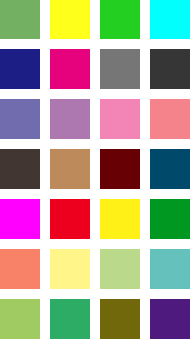
Coloured Squares Filled in

I made each of my squares 40 x 40 pixels in size.

3. Colorize

In your layers window, add a solid color layer by clicking the create new fill or adjustment layer button, then choosing solid color from the drop down menu.
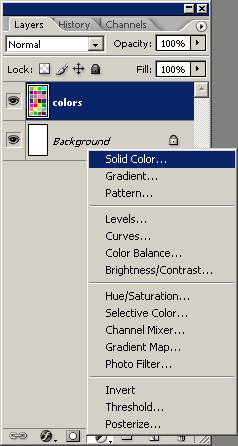
create a solid color layer

After you’ve done this, choose any old color for the Solid Color adjustment layer.

4. Settings

Lower the opacity for the color layer to 80%, then change the layer mode to Color.
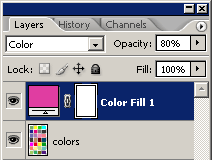
layer mode and opacity

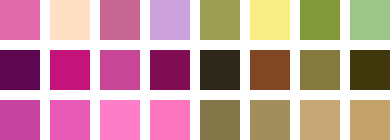
Since I used a pinkish color I’m left with this palette:
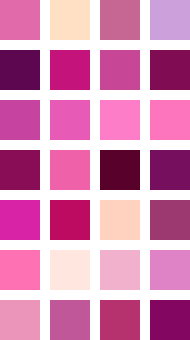
Solid Color Layer Settings Updated

Now you have a very cool colour palette that you can use in your design that will work well together. Save your images as .gif images and open them up any time you need a nice colour palette.

Make Quick & Easy Colour Palettes

Credit to Mash11 from deviantART.

Return home. Published Oct 29th, 2006 under Photoshop Basics.
Random Next
Digg Delicious Reddit Float Stumble

You must be logged in to post a comment.

12 responses

Christian said:October 30th, 2006

Very useful.

I can recommend http://colorblender.com/ , it is more handy.

Jahangir agha said:November 23rd, 2006

Excellent tutorial,

For colors combinations I use http://www.colorschemer.com

It is really very useful.

Pedram said:November 24th, 2006

Uhm.. wow? I’ve been wondering about this for ever…

at said:February 3rd, 2007

Thanks!

pbnj said:April 6th, 2007

very nifty tip, thanks for sharing! =)

April said:April 16th, 2007

Awesome. I’ve used colorschemer and colorblender, but the color schemes from them are either bland (all shades of one color) or painful to look at (way too contrasting). This is perfect.

Kendra said:December 3rd, 2007

Awesome! What a genius tip. I’ve been trying to figure this out for ages.

Brittany said:January 2nd, 2008

Awesome!!! Definitely using this idea… I haven’t been able to figure out a great way to make color palettes… : )

Ashuper said:February 9th, 2008

This was very,very,very useful! Thank you so much!

Claret said:February 26th, 2008

This is very helpful for a newbie like me in choosing color that match.
Thanks for the tut.

SVargo said:February 29th, 2008

Wouldn’t it be easier just to go from black to light gray? Using Hue to colorize it. Then it won’t be similar colors like yours…

Grace C. said:March 30th, 2008

That’s a pretty nifty little trick! Thank you.